Lecture 8 - Binary search and more Towers of Hanoi
Download the original Jupyter notebookAs a starting point for this lecture, and a warm-up, let us go again over the following exercise. We covered similar problems already in previous lectures.
Exercise 1 Write a function find_value(lst, val), that returns an index i s.t. lst[i] == val (if there are more such indices, you can return any).
Solution.
def find_value(lst, val):
    for i in range(len(lst)):
        if lst[i] == val:
            return i
    return -1
We added return -1 at the end. If the value does not appear in the list, the function will return -1, indicating this.
find_value([2,6,8,4, -3 , 4], 2)0find_value([2,6,8,4, -3 , 4], 8)2find_value([2,6,8,4, -3 , 4], 42)[]What if we try to look for a value that appears twice in the list?
find_value([2,6,8,4, -3 , 4], 4)3The code as is returns only the first position where value 4 appears.
Exercise 2 Modify the code above, so that it returns a list of all positions where the desired value appears in the list.
Solution.
def find_value_all(lst, val):
    result = []
    for i in range(len(lst)):
        if lst[i] == val:
            result.append(i)
return resultfind_value_all([2,6,8,4, -3 , 4], 2)[0]find_value_all([2,6,8,4, -3 , 4], 8)[2]find_value_all([2,6,8,4, -3 , 4], 4)[3, 5]find_value_all([2,6,8,4, -3 , 4], 42)[]Binary search
The binary search algorithm was already discussed in the theoretical part of the course, as it turns out correctly implementing this algorithm for the first time is at times a bit tricky.
A simple instantiation of a binary search algorithm can be understood via the following game: let us say that Alice thinks of a number $x$ between $1$ and $1000000$. Bob can ask her questions: Is the number $x$ you are thinking of larger, smaller or equal to $y_i$.
How many questions does Bob needs to ask to pin down Alice’s number $x$?
Surprisingly, even though the range is rather large, there are $1000000$ different numbers, Bob will be able to get away with as few as $20$ questions. More generall if Alice thinks of a number between $1$ and $n$, Bob can solve pin down Alice’s number with $\lceil \log_2 n \rceil$ questions.
While the analysis for a number of questions Bob is asking is not completely trivial, the strategy for Bob is very natural to many of us; what should be his first question? Absent any knowledge about the number $x$, beyond the fact that it is between $1$ and $1 000 000$, the most reasonable thing for Bob to do is to ask how $x$ compares with $y_1 = 500 000$ - half of the range. Once Alice says it is larger, he will know that the number that Alice has in mind is somewhere in the range between $500001$ and $1 000 000$, he can ask again about the middle of this interval, and so on, until he will have figured out an interval that contains exactly one number.
Note that every query halves the length of the range that we know contains Alice’s number. After $\lceil \log_2 n\rceil$ queries, this length must be at most one.
Searching for an element in a sorted list
Consider a setup similar to the Exercise 1, but when we have in addition a promise that a list that we are provided as an argument to the function is sorted (for simplicty, let us even pretend that all the elements of the list are distinct, so it is strictly increasing, and we are promised that the elment we are looking for is in the list). Can we do anything better than going over the entire list in a search of the element we are looking for?
The same idea of a binary search, described in the context of a guessing game, is applicable here: our algorithm should keep a range of indices in the list where the given value val needs to be, say by storing two variables start and end. Initially we can set up start = 0 and end = len(lst)-1: all we know is the element is somewhere in the list.
At each stage, we compute the exact mid-point of the interval [start, end] (remember to use integer division operator // 2 as opposed to floating point division /2, and compare the value at the mid-point with the value we are looking for. The result of the comparison will tell us, on which side of the mid-point is the value we are looking for: we can update either the start or end variable or proceed to the next iteration (unless we happend to be lucky, and we hit exactly the value, in which case we can directly return the index).
Implementing this correctly, handling all the corner cases (where the range have only one, two or three elements), is surprisingly tricky at first. You can use this code to test your implementation:
input_list = [2,5,8,23, 45, 66, 113, 122]
for i in range(len(input_list)):
    if i != find_value(input_list, input_list[i]):
        print("Wrong answer for ",i)
Exercise 3 Assume that lst is strictly increasing, and val is somewhere in the list. Find i s.t. lst[i] == val using a binary search:
def find_value_monotone(lst, val):
    start = 0
    end = len(lst)-1
    while start <= end:
        mid = (start + end) // 2

        if lst[mid] == val:
            return mid

        if lst[mid] > val:
            end = mid - 1
        else:
            start = mid + 1
With some cleverness the code above be quite a bit shortened. For example, we do not necessairly need to consider three cases; it is enoguh to check if lst[mid] >= val, but then one needs to be even more careful with updates and final conditions. A solution like the one obve, while not the shortest one, is very natural to understand and implement, as your first attempt at writing a binary-search based algorithm to find an element in a sorted list.
Let us see if it works:
input_list = [2,5,8,23, 45, 66, 113, 122]find_value_monotone(input_list, 23)3Seems to work on a one input, let us try to find every single value in the list input_list one by one:
for i in range(len(input_list)):
    if i != find_value_monotone(input_list, input_list[i]):
        print("Wrong answer for ",i)
Caution, some wrong solutions
We have spend the last two lectures discussing the recursive functions in Python, and binary search seems to have a recursive structure. A natural way to implement it, would be through a recursion.
While for this specific problem I recommend eventually using an iterative way, it is valid exercise: it is worthwile to be comfortable with both implementations and consciously choose one better suited for the task.
When attempting to implement a binary search recursively for the first time we can think of the following recursive structure:
- We want to find an element
valin the listlst. Let us look at the midpoint of the list,mid = len(lst) // 2, and compare it withval - If
lst[mid] == valwe found what we were looking for. - If
lst[mid] > val, we just need to recursively find the valuevalin the first half of the list, we can do it recursively. - If
lst[mid] < val, the same but for the second half of the list.
A naive way of implementing this high-level idea as a Python code would then look like this:
def binary_search_wrong(lst, val):
    if len(lst) == 0:
        return -1
    mid = len(lst) // 2

    if lst[mid] == val:
        return mid

    if lst[mid] > val:
        return binary_search_wrong(lst[:mid], val)
    else:
        return binary_search_wrong(lst[mid+1:], val)
Exercise 4 Can you say what is wrong with this code?
There are two issues in the implementation above. The first, smaller issue is that the code will produce wrong answers most of the time. Let us see:
for i in range(len(input_list)):
    if i != binary_search_wrong(input_list, input_list[i]):
        print("Error ", i)
Error 3
Error 5
Error 6
Error 7What is happening? Let us look at the recursive calls, in both cases we call recusively binary_search_wrong on either half of the list, but when we call it for the right half of the list (i.e. lst[mid] < val), the recursive call is supposed to be returning the position of val in this shorter list. That is very different than the position of val in the original list that we are supposed to be returning.
To make sure you understand what seems to be the issue, just analyze step-by-step what the code would do in the following smallest bad example, and why it is doing that:
binary_search_wrong([3,5,11], 11)0This, fortunately, is not too difficult to fix: as we get a result from the second recursive call, we need to adjust it by what will be the position of the index in the list we started with. That is the line
return binary_search_wrong(lst[mid+1:], val)will become
return mid + 1 + binary_search_wrong(lst[mid+1:], val)def binary_search_still_wrong(lst, val):
if len(lst) == 0:
return -1
mid = len(lst) // 2
if lst[mid] == val:
return mid
if lst[mid] > val:
return binary_search_still_wrong(lst[:mid], val)
else:
return mid + 1 + binary_search_still_wrong(lst[mid+1:], val)Let us check if this code returns the right answer:
for i in range(len(input_list)):
    if i != binary_search_still_wrong(input_list, input_list[i]):
        print("Error ", i)
Looks much better, but is it?
Main issue with this implementation The fundamental problem with the implementation above was less about the fact that it gave the wrong answer (it was easy to fix it after all), and more about that it completely misses the point!
The reason we are implemening a binary search, over a simple linear search as in Exercise 1, is the efficiency: we would like to find an element of interest in $O(\log n)$ operations, not $\Theta(n)$. But is our code actually doing it?
Not at all! Even in the first recursive call, we have the innocuous looking list-slicing operation lst[:mid] or lst[mid+1:] - this is creating a copy of eifther the first, or the second half of the list, each of them has $n/2$ elements. Just preparing this copy for the first recursive call will already use $\Omega(n)$ time, and with all the constant factors involved in memory managment, is likely going to be already much slower than a linear search. Then we go over to the recursive call, and keep copying smaller and smaller sub-lists.
The entire thing is just unnecessary complication for no benefit at all.
Correct recursive implementation:
If we want to write correctly a recursive implementation of a binary search, we need to make sure that we never start copying the input list (so we need to avoid using the slicing operator lst[start:end]. We can keep passing the reference to the input list down to the next recursive call, this is cheap - does not involve copying the list, but instead of slicing it, we better just directly pass as arguments the start and end point of the current interval of interest. A correct recursive code for a binary search (assuming that the element surely is in the list) could look for example like this:
def binary_search(lst, val, start, end):
    mid = (start + end) // 2
    if lst[mid] == val:
        return mid

    if lst[mid] < val:
        return binary_search(lst, val, mid+1, end)
    else:
        return binary_search(lst, val, start, mid-1)
Let us see if it works:
for i in range(len(input_list)):
    if i != binary_search(input_list, input_list[i], 0, len(input_list)-1):
        print("Error ", i)
At least on the input list, it seems to correctly be able to find every element that is present in this list, looks good!
Exercise 5
What happens with the code above if we provide as an argument val a value that does not appear on the list? Modify the code to handle that scenario correctly, and return -1.
Back to Towers of Hanoi
During the last lecture we looked at a recursive implementation of an algorithm producing a sequence of moves solving the famous Towers of Hanoi problem for a given n. I included (you can see this only in the python notebook file, the visualization code is not included if you are reading it in the browser) at the beginning of this notebook a short piece of code visualizing a Towers of Hanoi configuration, that will help us understand how the recursive algorithm analyze.
First, we need to decide on how do we want to store any specific configuration for a towers-of-hanoi puzzle. We will choose storing it as a triple (a tuple of size exactly $3$), containing three lists. Each of list stores a sequence of decreasing integers, denoting the sizes of discs on an corresponding rod.
For example:
configuration = ([5,4,3,2,1], [], [])The three lists together must contain all numbers from $1$ to $n$, and each exactly once.
Exercise 6 Write a function prep_starting_configuration(n) that takes a single integer $n$ as an argument, and returns a starting configuration with $n$ discs.
def prep_starting_configuration(n):
    lst1 = []
    for i in range(n):
        lst1.append(n-i)
    return (lst1, [], [])
config = prep_starting_configuration(5)config([5, 4, 3, 2, 1], [], [])Let us see how it looks like using the draw_hanoi function:
draw_hanoi(config)
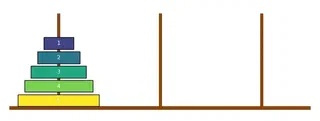
Now, let us rewrite a function hanoi_towers(n, source, target, aux) from the previous lecture. The function should return a list of moves needed to move $n$ discs from the source rod to the target rod. The aux is just a number of the remaining rod (that is neither the source, nor the target).
def hanoi_towers(n, source, target, aux):
    if n == 0:
        return []
    result = hanoi_towers(n -  1, source, aux, target)
    result.append( (source, target) )
    return result + hanoi_towers(n-1, aux, target, source)
Let us try to move two discs from the tower 0 to the tower 1:
hanoi_towers(2, 0, 1, 2)[(0, 2), (0, 1), (2, 1)]We can do it in three moves: we first move the smaller disc from 0 to 2, then the larger disc from 0 to 1, and finally the smaller disc from 2 to 1. Makes sense.
To visualize the configuration after applying a sequence of moves, we would like to write a function that actually applies a given sequence of moves to a given configuration. To do this, it might be useful to use the lst.pop() function, one that we have not seen yet. It does the opposite of append: it just removes the last element from the list (and returns it)
lst = [2,5,22, 33]lst.pop()33lst[2, 5, 22]Exercise 7 Write a function apply_moves(config, moves). The argument config is a valid hanoi configuration (i.e. triple of lists, each containing decreasing integers), the argument moves contain a sequence of moves in the same format as returned by the function hanoi_towers. The function apply_moves, should not return anything, it should modify the lists stored in the configuration config, applying all the moves one by one.
Solution.
def apply_moves(config, moves):
    for s,t in moves:
        config[t].append(config[s][-1])
        config[s].pop()
Visualization
How does the Hanoi towers recursion work? Let us prepare a staring configuration with $5$ discs.
config = prep_starting_configuration(5)config([5, 4, 3, 2, 1], [], [])draw_hanoi(config)
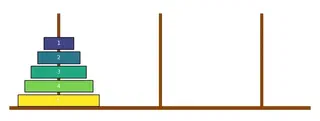
What would hanoi_towers(5, 0, 1, 2) do? If we read the code closely, it starts by calling hanoi_towers(4, 0, 2, 1). To move $5$ discs from tower $0$ to tower $1$, we first move the top four discs from tower $0$ to tower $2$
apply_moves(config, hanoi_towers(4, 0, 2, 1))draw_hanoi(config)
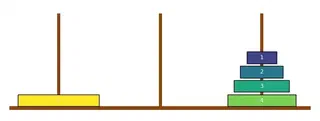
Then, we use just a single move to move a single disc from 0 to 1 – the target we are attempting to stack on:
apply_moves(config, [(0, 1)])draw_hanoi(config)
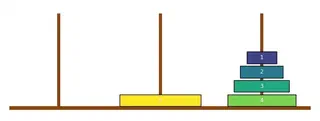
Now, all we need to do is move the stack of four discs from the rod 2 to the rod 1:
apply_moves(config, hanoi_towers(4, 2, 1, 0))
draw_hanoi(config)